Categories
article

Why APITable is Your Best CRM Choice: Simple, User-Friendly, and Efficient

A question related to CRM: Have you ever carefully tracked the distribution of workload among the sales team or yourself? You will find that non-sales tasks occupy more than half of the energy expended by salespeople every day.

Updating customer information, keeping visit records up-to-date, cleaning leads, tracking the progress of opportunities… Most of these tasks are manual and repetitive. So why not try automating them to save time and allow salespeople to focus more on their business?

But how can you achieve CRM automation with the help of software tools? APITable offers powerful and lightweight features to provide you with efficient solutions in various aspects, from customer information management to lead and task management.

Customer Information Management Automation

Customer information data serves as the foundation of CRM. To excel in customer information management, a comprehensive and error-free approach to data entry, organization, and maintenance is necessary. APITable takes it a step further by leveraging its automation capabilities to reduce the frequency of operations and error rates for salespeople, ultimately saving a significant amount of time.

(1) Automatic Import

With APITable’s extensive range of data field types, you can directly input detailed customer information into tables.

Certainly, APITable also supports importing Excel and CSV files. For those who frequently use Excel to manage sales and customer data, they can easily import their data into APITable with just one click, and then make precise adjustments to column data types.

Moreover, if you are already using a CRM system or software, you can connect and transfer data using APITable’s Zapier integration. For instance, you can import customer information from platforms like Salesforce or other CRM systems directly into APITable.

(2) Automated Reminders

Customer maintenance is a critical task for salespeople. Deciding on the frequency of phone calls or in-person visits requires constant attention. However, the cumulative time spent on checking, confirming, and estimating can be taxing.

Fortunately, with APITable, you can set up regular reminders to contact customers automatically. By utilizing intelligent formula fields in APITable, you can calculate the number of days since your last contact with a customer. Then, using APITable’s built-in robot, you can set triggering conditions (e.g., when the time exceeds 10 days) to automatically push reminder messages to your Slack or email.

Of course, you can achieve the same effect using APIs and Zapier integration. Together with robots, these three components form the foundation of APITable’s automation capabilities. In addition, to contact reminders, other customer engagement scenarios can include birthday reminders and holiday greetings, allowing for more detailed customer maintenance.

(3) Customer Information Security

Customer information is valuable company property. APITable offers comprehensive permission features, allowing you to set permissions such as “management,” “editing,” or “view only” for individual tables or specific columns within a table. You can specify specific individuals or groups to perform operations, ensuring data security.

Automating Lead Follow-ups

Leads represent potential sales, but how can you efficiently collect, clean, and follow up on these leads? APITable has the answer for you.

(1) Automated Lead Collection Consolidation

With the capabilities of API and Zapier integration, you can consolidate sales leads from various platforms into a single table in APITable for unified lead management.

Additionally, APITable’s “Form” feature provides another means of lead collection. Simply complete a quick lead collection form on your phone or computer, and the data entered will automatically be consolidated into the relevant record table, saving you time and effort.

(2) Rapid Lead Cleaning

Utilizing APITable’s rich multi-dimensional views and powerful grouping and filtering functions, you can quickly and accurately clean leads and organize them based on urgency, enabling your sales team to efficiently explore business opportunities.

For example, in the Gantt view, you can track and manage customer inquiries, visits, and follow-ups by different colored progress bars. In the Kanban view, you can easily manage and edit lead statuses by dragging and dropping.

(3) Automated Flow of Opportunity Leads

Opportunity leads require human follow-up to convert them into sales opportunities. Within the lead pool built in APITable, you can freely assign leads to any member of the sales team. Leveraging APITable’s automation capabilities, you can instantly send notifications to the respective individuals, ensuring that leads and opportunities are properly handled without miscommunication, omission, or duplication.

Task Management: Automating Collaboration

After discovering business opportunities and closing deals, salespeople often encounter more collaborative tasks, such as contract follow-ups with administrative and legal personnel or handovers to the after-sales service team. In APITable, everything runs smoothly.

(1) Automated Collaboration Workflows

From business negotiations, successful orders, contract drafting, and contract signing, to after-sales service… each sales task has different stages. With APITable’s automation capabilities, when the task status changes, you can trigger robots or Zapier integration to notify the relevant individuals, enabling timely collaboration and smooth completion of the entire workflow.

(2) Easy Collaboration with Traceability

APITable supports real-time collaboration among multiple users and provides a commenting feature for focused communication on specific tasks. Additionally, it offers a history of modification records, allowing you to easily track “who made what changes” while maintaining the flexibility to make modifications. This ensures clear accountability and transparency.

Customized Customer Lifecycle Management OS

APITable’s automation solutions significantly enhance the efficiency of CRM customer relationship management. However, in addition to efficiency, APITable demonstrates strong customization capabilities for CRM management systems.

Thanks to APITable’s “Magic Link” feature, data synchronization across different tables is achieved, allowing you to connect business modules and data according to your needs, structuring and systematizing the adaptation from the lead collection and customer information management to cross-department collaboration. This enables the creation of a customized CRM system tailored to managing the entire customer lifecycle.

Improve the productivity of your sales team by eliminating mechanical tasks. APITable provides you with a high-quality CRM automation solution.

Cover image source: https://ledlightstation.com/

Categories
article

APITable vs Excel: Transforming the Way of Work Management

For decades since the birth of Excel, businesses have heavily relied on spreadsheets. From managing operations, and data recording, to financial calculations, Excel has been the go-to tool.

However, with the evolution of the business landscape, there have been significant changes in business models, collaboration methods, and data analysis requirements. More and more companies are now turning towards new tools like APITable and Airtable.

If you are also considering a tool migration and are not familiar with APITable, this article aims to distinguish the differences between APITable and Excel, helping you find the suitable business solution for your needs.

The Fundamental Differences between APITable and Excel

When first encountering APITable, one might perceive it as similar to Excel, assuming they both belong to the realm of spreadsheet products. However, they differ fundamentally. Excel is a spreadsheet software, whereas APITable is a relational database and a simple and powerful work management OS.

Spreadsheet, like Excel, is a digital ledger that revolves around static, two-dimensional documents primarily used for data storage and calculations. However, this limitation restricts your access, organization, and data connectivity, making it more suitable for financial data analysis and business scenarios.

On the other hand, APITable, as a relational database, may initially appear similar to a spreadsheet in terms of interface and interaction. However, it serves as an excellent tool for structured data, allowing storage, retrieval, and recording of diverse data types.

APITable possesses characteristics such as data structuring, logical independence, and distributed independence. It aids in quickly retrieving the desired information, organizing and analyzing data, creating visual reports, and even building work management systems to track and manage workflows.

Therefore, from the perspective of usage scenarios, APITable is suitable for any industry, and you can create a work management OS according to your specific needs, including project management, marketing, customer relationship management, human resource management and other different industries.

APITable vs Excel: Data Presentation Formats

Another significant difference between APITable and Excel lies in APITable’s flexible multidimensional view transformations, which Excel lacks. This is made possible due to APITable’s data structuring capabilities.

Although the Grid view interface in APITable may appear similar to Excel, with rows and columns, APITable allows for transformations. In APITable, individual data records can be easily transformed through different views, enabling more intuitive and concise visualizations.

For example, while creating a Gantt chart in Excel would require filling in individual cells with colors, APITable can generate it with a single click. In addition to this, APITable offers various other view options, such as Calendar View, Kanban View, Gallery View, Architecture View, and form View, allowing you to switch between them effortlessly.

APITable vs Excel: Data Interconnectivity

Excel possesses excellent data calculation capabilities. However, data usage in Excel is typically one-time and limited to a single machine. Achieving data reusability often requires high learning costs, such as using functions like VLOOKUP or macros. Collaboration among multiple users also requires additional steps, like uploading to the cloud, which can be inconvenient.

In contrast, APITable supports Infinite Cross Link. Once entered, data in APITable can be referenced, synchronized, and viewed in multiple tables without errors. The ability to reuse data and establish cross-table connections significantly enhances data flow efficiency and reusability, resulting in a notable improvement in office productivity.

APITable’s capability for seamless data integration and real-time updates across multiple tables eliminates the need for repetitive data entry and manual synchronization, making it a powerful tool for data collaboration and enhancing overall work efficiency.

APITable vs Excel: Three-Dimensional Structural Features

In Excel, data categorization and filtering often rely on adjusting cell formats, such as merging and splitting cells. However, in APITable, data is structured with stability and interconnectivity, allowing for grouping and multidimensional view transformations.

One notable advantage of this structured approach is that data in APITable can undergo three-dimensional transformations, taking the form of familiar “forms.”

Furthermore, you can take it a step further by utilizing APITable to visualize data as a BI dashboard.

APITable vs Excel: Automation

When it comes to automating tasks in Excel, you may encounter certain difficulties. It often requires learning macros, VBA, and other related knowledge to achieve limited automation.

However, in APITable, automation becomes remarkably simple. APITable supports integration with Zapier, allowing you to connect APITable with over 5000 applications and create automated workflows. ( For specific instructions and recommended templates, you can refer to this article )

You can also utilize APITable’s automation robots, which can automatically execute specified actions based on predefined trigger conditions. This helps you accomplish repetitive tasks and reduce your workload, such as automated email sending.

In addition, APITable’s powerful API capabilities, combined with a One-Click API Panel, provide a seamless experience for data retrieval and integration. This makes APITable a valuable tool for businesses seeking to streamline workflows and increase productivity.

APITable vs Excel: Affordable

Finally, a simple price comparison is provided to facilitate your tool selection. It is worth mentioning that Excel is not charged separately, you need to purchase the full Microsoft 365 plan, which also means that you may have to pay for features that you don’t actually need. For plans that are similar in price, APITable’s value for money is 200% better than Excel’s.

In conclusion, if you have gained an understanding of the differences between APITable and Excel through this article and are looking to choose a software tool that is more suitable for team collaboration, and work management, and adaptability to business growth, then it’s time to give APITable a try.

Categories
article

APITable vs ClickUp: What Should I Choose For Work Management?

APITable and ClickUp are both work management and project management software, aimed at improving productivity for businesses, organizations, and teams.

But there are also differences between the two. Simply put, APITable emphasizes that it is a simple and powerful work management OS, while ClickUp emphasizes its completeness of features, claiming to replace all tools.

To make a better decision on tool selection, you can refer to the following information to distinguish the differences between the two. Of course, the best way is to try it out for yourself: APITable.com.

What is ClickUp?

ClickUp is a project management tool and productivity platform that helps teams collaborate and manage their work in one place. It provides a wide range of features such as task management, time tracking, project planning, team communication, and more.

The company claims that its product can perform more than 100 functions simultaneously, replacing numerous pieces of third-party software.

What is APITable?

APITable is an incredibly simple and powerful work management OS. No complex setup or training is required; you can get started with APITable instantly. With APITable, you can quickly create workflows and work systems to improve your team’s efficiency and collaboration. Over 2000 organizations worldwide have validated the universality and applicability of applications created with APITable across various industries.

From marketing, and CRM to HR, product development, and operation, APITable can build a work management system that meets your business development needs.

For example, keep workflows running efficiently with APITable’s automation, so you can monitor all of your ongoing marketing campaigns in real-time. Or, experience customized sales cycles, centralized customer management, automated sales processes, and many other aspects on one platform by APITable.

Underpinning all of this are APITable’s powerful features, which include:

  • Realtime Collaboration: Enables co-editors to edit one cell together and sync in real time for seamless teamwork and efficient project management.
  • Form Design: One-click, auto-generated, and extremely user-friendly Form.
  • API – first: Full-stack API access, from Data to Metadata.
  • Workflow Automation: Configure custom trigger-action workflows directly to save time from repetitive tasks.
  • Unlimited Table Links: Link unlimited tables on a single page without creating a “Base/App”.
  • Powerful Permissions: Columns / Rows / Files / Views can all be set with permissions as required by the role.
  • Extremely Extensible: Extend your APITable without limits with the customizable widget, dashboard, automated bots, and more.

APITable vs ClickUp: Major Similarities

APITable and ClickUP are both no-code/low-code tools that can assist in designing a project or work management system with simple operations. Of course, the most important points of agreement are in the following areas:

Rich view types

There are a variety of view options offered by both APITable and ClickUP, which allows users to view work in different ways.

APITable has 7 types of customizable views included, such as Table View, kanban View, Gantt View, Architecture View, Gallery View, and Calendar View which can help support task management and project management, offering more diverse formats of information presentation.

In addition, you can customize your own BI dashboard to show a comprehensive overview of your project or work, monitor progress, and make interventions.

Collaboration

APITable and ClickUP both provide a variety of methods for communicating and collaborating with team members.

In APITable, you can collaborate with team members in real-time and quickly assign tasks to any member. It also provides an instant commenting feature and station message notifications, so that work communication can be resolved quickly and centrally.

Workflow Automation

Workflow automation can help simplify the execution of repetitive tasks, especially in work management and project management, by reducing manual data entry and manual notification of message changes, enabling faster task delegation and progress. Both APITable and ClickUp offer relevant features to support workflow automation.

In particular, APITable provides various automation options to enhance efficiency. For instance, APITable supports Zapier integration, allowing you to connect APITable with over 5000 applications and create automated workflows using your most commonly used software tools in conjunction with APITable. For example, sync Mailchimp’s subscriber list in APITable, automatically send emails or Discord messages after creating a new record in APITable, and more.

You can refer to this article for specific instructions and recommended templates.

In addition, APITable also features automation robots that can integrate data from datasheets with various business systems and apps. These robots can automatically perform specified actions based on preset trigger conditions, helping you complete repetitive tasks and reduce your workload.

For example, when a task status changes, an automated message can be sent to a Slack channel to notify the relevant stakeholders. Similarly, when a new form entry is made, an automated email can be sent to the respective team member for further processing.

APITable also has a product feature that ClickUp does not have, which is Infinite Cross Link. Unlike other Low Code Software, including ClickUp, APITable is not a “Base/App” structure. You can link unlimited and infinite tables in one space. Synchronization of data across multiple tables streamlines workflow management and eliminates the need for redundant data entry when assigning and transferring tasks.

Now that we have discussed the differences between APITable and ClickUp, let’s dive into the notable distinctions between the two in the following section of the article.

APITable vs ClickUp: Differences

Even though APITable and ClickUp are excellent work management and project management solutions, they differ significantly from one another.

APITable vs ClickUp: Simple & Complicated

APITable features a user interface based on a flexible spreadsheet format that can be customized to suit various business needs. On the other hand, ClickUp is a comprehensive collection of applications that aims to replace common work software available in the market, offering a centralized platform for tasks, docs, chat, goals, and more.

Since ClickUp provides so many functional applications, it’s fantastic for project teams to be able to handle everything about project management and collaboration within ClickUp. But the fact that it has so many functions can lead to a waste of time and resources. For users who are using ClickUp for the first time, it takes more time to learn, and it is difficult to master.

APITable’s simplicity and flexibility enable it to operate similarly to Excel, allowing users to instantly get started without requiring complex setup or training.

The difference in product form may also be a factor in the consumer’s decision. Because ClickUp strives to cover all work linked and software replacement, you are likely to have to abandon existing work software and project management systems and re-establish a set of work methods and order. The choice of APITable, on the other hand, is much more flexible. Users have the option to utilize APITable either as an independent work and project management system or in conjunction with existing systems.

APITable vs ClickUp: How the API is used

One of the key focuses of APITable, as compared to other similar software tools, is its emphasis on being API-centric. Whether it’s data transfer between software applications or serving as a backend database to rapidly build product prototypes and validate ideas, you can leverage APITable’s API interface.

In addition, APITable’s One-Click API Panel provides seamless data retrieval and connection experience, making it a valuable tool for enterprises seeking to streamline workflows and enhance productivity. But in ClickUp, you need to download an app to test and work with APIs.

APITable vs ClickUp: Permission Management

As a collaborative tool, especially when dealing with tasks related to work and project management, robust permission management is an essential feature. However, ClickUp appears to be relatively weak in this aspect. Users with the highest-tier Enterprise version have exclusive access to customized permissions, custom roles, restrictions on public sharing, and other similar features. Even team space sharing and team support are subject to significant restrictions.

In contrast, APITable provides detailed permission management functionality. For example, it offers three different roles with varying editing, viewing, and management permissions. It allows you to assign specific permissions to individuals for different folders, tables, and even rows and columns. This enables you to have better control over centralized work and project information while effectively managing team collaboration and administration.

APITable vs ClickUp: Open Source and Freedom of Embedding

While ClickUp is undoubtedly an excellent project management software, it is not an open-source solution. For teams that prioritize autonomy and security, a self-hosted edition may be a more pressing need. But APITable both offers a Cloud Edition and an open-source Community Edition. It offers more flexible options for teams that seek data independence. You can deploy the APITable Community Edition in your own cloud and integrate it with existing systems/apps.

APITable believes that everyone should have their own work management OS.


Moreover, APITable’s freedom of development is also evident in its embedding feature. You can create custom personalized tables and dashboards using iframes and APIs. And that generates targeted embedded links to integrate APITable into any product or tool. This allows you to enhance the work management capabilities of your favorite tools or work systems, giving them more robust functionality.

In conclusion, APITable is a simple, ightweight, and Powerful Work & Project Management Tool Worth Considering. It caters to your needs for flexible customization, independent security, and easy adoption, providing great assistance to team collaboration and work efficiency. Try APITable today

Categories
article

APITable: Simplifying Requirements Management for Easy Delivery

Requirements management is an important part of project management. In the previous article, you might have learned about the general advantages of APITable as a project management tool. So, how can APITable help you when you encounter difficulties in the requirements management process?

We all know that the requirements management process includes requirement gathering, requirement analysis, requirement review, and requirement tracking. Any failure in any of these steps can result in budget overruns, decreased quality, and delayed schedules.

You need a good requirements management tool that can help you organize and classify requirement information more effectively, making it easier to understand and analyze, thus improving project management efficiency and accuracy. At the same time, it should also help you to reduce the burden on process standardization and automation.

This article will show you the exceptional features of APITable as a requirements management tool, providing you with an all-in-one, comprehensive, concise, easy-to-use, and automated requirement management solution.

Full process control of requirements management

Form, datasheet, document, board… Have you switched between too many tools during the requirements management process? In APITable, all processes, from requirement gathering to review, to delivery tracking, can be controlled at one station throughout the entire cycle.

(1) Requirement gathering

Users can easily convert a datasheet of requirements into a form and generate a requirement collection form with the assistance of APITable’s form. The form automatically summarizes form records submitted from different sources into the requirement datasheet, eliminating the need for secondary sorting.

(2) Requirement analysis and review

With APITable’s rich field types (such as Single line text, Select and Multi-select, Date, Attachment, etc.) and powerful filter and group functions, you can intuitively organize requirements at the first time.

With just one click on a single requirement record, you can clearly see all the processes related to that requirement: the proposer of the requirement, requirement details, user demands, estimated working hours, priority, etc.

Smooth multi-person real-time collaboration and commenting functions allow the team to communicate about individual requirement records during the requirement review process and finally evaluate the next action for the requirement.

(3) Requirement allocation tracking

Once the requirement is decided upon, the question of who will do it and how arises. Users can cross-link data between datasheets with the assistance of APITable’s “Magic Link” and “Lookup” functions.

Linking the requirement datasheet with the task datasheet and the team member datasheet can achieve a one-to-one correspondence between the requirement and the task, as well as the requirement and the executor, making it easy to track and manage, and avoiding confusion.

Requirement progress visualization

In addition to managing and allocating requirements in datasheets, you can also visualize requirement progress with APITable’s powerful view function, allowing you to quickly understand the current state of requirements and keep up with the pace.

Users can switch both the requirement datasheet and the task datasheet to various view forms, such as Kanban view, Gallery View, and Gantt view.

In the Kanban view, you can easily drag single requirement and task records to quickly adjust the status of requirements/ tasks.

Using the Gantt chart to track task progress in real-time, you can understand the urgency of requirements/ tasks through progress bars of different colors.

The calendar view allows you to stand at the time dimension and examine the rhythm of requirements/ tasks.

In addition, you can use dashboard and chart applets and other functions to build BI data screens, visually displaying project progress and completion.

Automated assistance for requirements management

When you feel satisfied with using APITable’s datasheet for straightforward and intuitive requirement management, you might not think of getting the support of automated capabilities, which makes the whole process even easier.

Automated Notifications

With APITable, it’s easy to visually track the flow of demand tasks. However, you can’t keep an eye on it 24/7 when you have other work to do.

How can you quickly receive notifications about demand changes, task status updates, and warnings that demands are about to expire? By leveraging APITable’s automation capabilities, you can achieve efficient information dissemination and communication.

send a message to Discord channel when a new record is created

You can use the Robot to push demand change notifications to your email or Slack in a timely manner based on pre-set trigger conditions.

You can also connect APITable to Slack, email, Discord, Microsoft Teams, and other applications through Zapier to achieve automatic notifications.

send a custom email when a new record is created

This greatly improves the efficiency of demand flow.

Automation Across Departments

A demand usually requires the cooperation of multiple departments, such as corresponding UI design requirements for functional development requirements. Repeated form-filling and unsynchronized information can sometimes bring confusion and trouble.

But with APITable’s Robot or Zapier integration, you can synchronize and update data across datasheets. Users can automatically write or reuse data from one datasheet in another datasheet, enabling a more flexible and automated association and integration into the overall workflow, thereby streamlining cross-departmental information synchronization.

More Automation Scenarios

APITable’s automation applications go far beyond this. In fact, APITable’s open API interfaces combined with Zapier can connect you to hundreds or thousands of third-party applications and services, expanding demand management, project management, and even complete work management system scenarios. For example, connecting to NPS can make demand feedback and changes more directional.

More application scenario connections require you to explore and discover based on your actual work.

APITable is a simple and powerful work management OS that is proficient in managing project management and even more detailed requirements management scenarios. If you want to use fewer and simpler tools to quickly improve requirements management efficiency, try building your requirements management system with APITable to help requirements management achieve more efficient, accurate, and reliable workflows, thereby improving project management efficiency and quality.

Categories
article

APITable vs. Asana: Exploring the Key Differences

Looking for a project management and team collaboration tool? APITable and Asana are two highly-rated options. But which one is right for you? In this article, we will compare the features and advantages of APITable and Asana. Regardless of the size of your project, this guide will help you make an informed decision.

Our guide provides some insights, or you can get started with apitable.com for free.

Here is the difference:

When comparing Asana and APITable, there are several key differences to consider:

  • Asana offers a structured, defined project management model, while APITable is a free, highly customizable work management OS with an extremely simple, intuitive user interface, and powerful capabilities, and allows for quick mastery of work management at zero learning costs.
  • Asana solely provides a cloud-based solution, while APITable offers the versatility of both cloud and open-source options.
  • Asana focuses primarily on goal and project management, whereas APITable provides a variety of optional templates and solutions for any scale business.
  • APITable stands out with its detailed access controls and affordable pricing.

What is APITable?

APITable is an Incredibly Simple and Powerful Work Management OS, enabling everyone to effortlessly collaborate on organizing goals, projects, and data.

With APITable, teams can integrate seamlessly with relational databases and create custom workflows, operating systems, and business models using a simple drag-and-drop interface. This allows teams to focus on what’s important while APITable takes care of the rest.

Unlike other project management tools such as Asana, APITable is not just a tool for managing tasks, but also provides a flexible architecture for connecting business data. It is perfect for managing a variety of tasks such as project management, sales, marketing, or customer relationships. APITable enables teams to create and connect the tools they need to run projects and processes in one place.

APITable offers Cloud and Community editions tailored to suit your specific needs. Trusted by over 20,000 organizations, APITable serves as a powerful and flexible work OS that empowers businesses of all sizes. Why not give APITable a try and witness its transformative impact on your projects and data management?

Key features and benefits of APITable

APITable is an Incredibly Simple and Powerful Work Management OS with powerful features for managing tasks across industries, including:

  • Real-time collaboration, which enables co-editors to edit one cell together and sync in real time for seamless teamwork and efficient project management.
  • Automatic forms for easy data collection from external parties.
  • Seven view types, from Grid, Gallery, Architecture, Form, Kanban, Gantt to calendar views, provide flexible data visualization.
  • Customizable dashboard for clear business display.
  • User-friendly API panel that can be opened with just one click allows for easy data access.
  • Fine-grained Permission Control, in which columns/Rows/Files/Views can all be set with permissions as required by the role.
  • Embeddable platform for easy access and ideal for businesses of all scales.

What is Asana?

Founded in 2008 by a Facebook co-founder and ex-Google engineer, Asana was designed to streamline team organization and project tracking. It empowers teams to work together and track progress towards their goals.

Asana is a powerful tool for managing tasks and collaborating with your team. It is ideal for teams looking to set goals, break down projects into manageable tasks, track progress, and meet deadlines. With its intuitive interface and robust feature set, Asana is a great choice for businesses of all sizes.

APITable vs Asana: A Customizable Tool vs. a Rigorous Project Management Model

Asana is a well-established project management tool with a defined project management model that provides a clear task-tracking method and a smooth user experience, making it easy for teams to collaborate on projects.

However, for those seeking a more customizable and flexible tool, APITable is an ideal solution. APITable is a hybrid of spreadsheets and databases, making it a versatile tool for data management and creating business models. You can tailor the tool to meet their specific needs, creating custom workflows and automating repetitive tasks.

This level of flexibility can be especially beneficial for businesses with unique processes or requirements that can’t be easily accommodated by off-the-shelf solutions like Asana. With APITable, you can streamline workflows, reduce tool redundancy, and improve productivity.

APITable vs Asana: Advanced vs. Basic Permission Management

Effective permission management is crucial when selecting a project management tool. Asana provides basic permission control based on projects, teams, tasks, access, and editing. However, this permission model may not be sufficient for teams that require collaboration across departments.

APITable, however, offers a more powerful permissions system and the ability to define custom identity groups for table members based on their visibility and editing permissions. This powerful feature is particularly valuable for teams working across multiple departments where confidential information cannot be shared in a single project.

APITable vs Asana: Custom-Tailored Dashboards vs. Basic Reporting

Reporting and analytics are essential for tracking progress and measuring success. Asana’s reporting focuses on tracking task completion, such as how long individual tasks take to complete. While Asana offers BI integration, it is limited to subscription plans and requires additional software.

In contrast, APITable offers custom reporting and flexible interfaces that use your data to create custom-tailored, shareable dashboards. Additionally, APITable’s Extensible Widget System enables integration with third-party reporting tools, such as Salesforce and Tableau, for even broader functionality.

APITable vs Asana: Linked Records vs. Separate Data

Asana allows users to associate one task with multiple projects, while APITable offers the capability to sync data from multiple tables and external sources. This feature is particularly useful for managing complex data structures and relationships.


When it comes to managing complex data structures and relationships, linked records are a game-changer. Asana’s approach allows users to associate one task with multiple projects, but it falls short of managing data across tables or external sources.

APITable, on the other hand, offers the capability to sync data from multiple tables and external sources, creating a more comprehensive and interconnected view of your data. With linked records, you can easily navigate through your data and visualize the relationships between different tables. This makes it easier to manage your information and make informed decisions. This feature is especially useful for teams that rely on data-driven insights to achieve their goals.

APITable vs Asana: Embedding All Your Tools Seamlessly or Adding Another Tool

Integration and compatibility with other tools are crucial factors to consider when choosing a project management tool. Asana provides optional solutions to help users manage goals and projects efficiently. However, it does not support open source, making it challenging to integrate with other tools.

APITable is a cloud and open-source work-OS that can be embedded into any product or tool using iframes and API functions. Its open-source edition can also be deployed on your server with one click, ensuring data security and reducing tool redundancy.

APITable vs Asana: Affordable

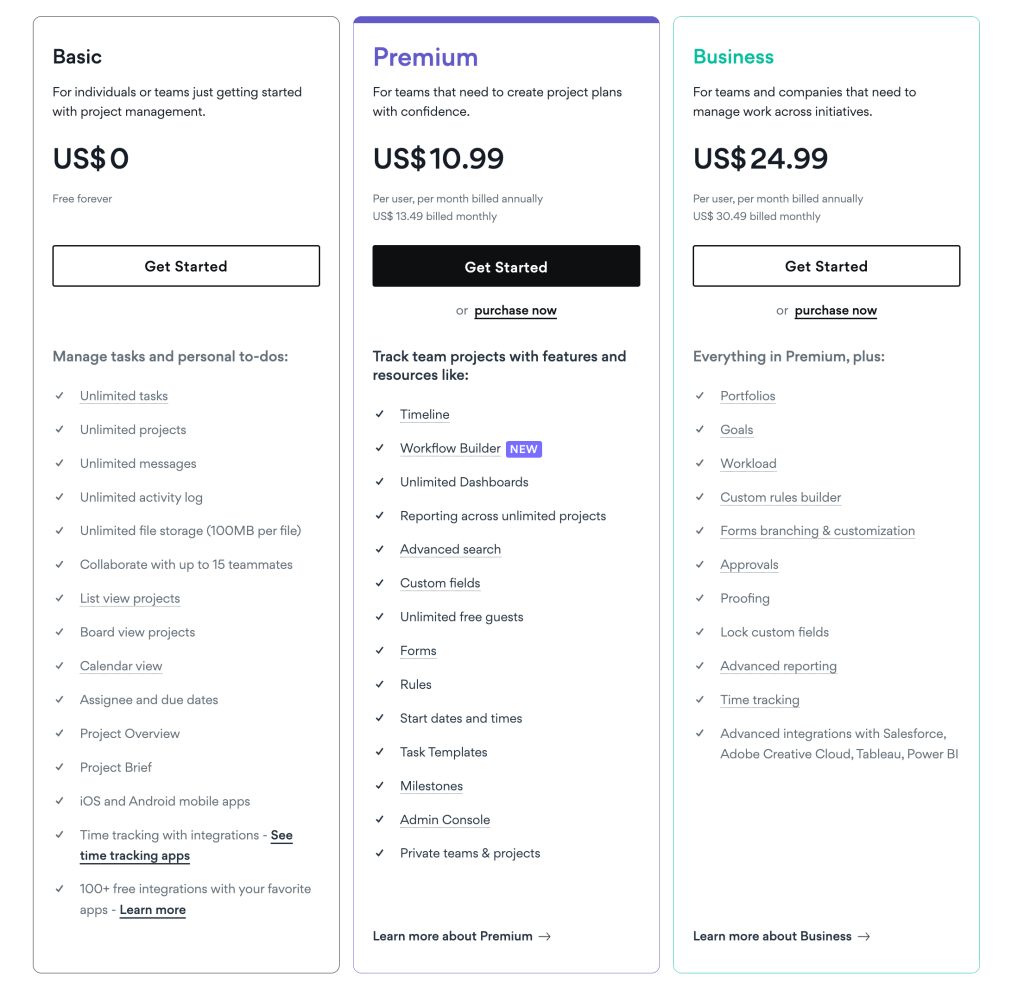
When selecting a project management tool, it is crucial to take pricing into account. Additionally, in cases where the price of plans is comparable, APITable offers significantly better value for money, approximately 200% more than Asana.Here’s a breakdown of both platforms’ pricing plans:

In conclusion, APITable is a powerful project management tool that offers a range of features to help teams collaborate more effectively.

If you’re looking for an affordable and powerful project management tool, APITable is an excellent choice. Its customizable and flexible features make it easy to use and fit your team’s unique requirements. Try APITable today.

Please leave your contact information first.